> ## Documentation Index
> Fetch the complete documentation index at: https://aibco.mintlify.site/llms.txt
> Use this file to discover all available pages before exploring further.
# Set Guardrails for Your AI Chat Behavior
> Guardrails let you add custom instructions that shape how your AI responds, layered on top of the platform's built-in safety rules.
Guardrails are custom instructions you write to control the tone, style, and boundaries of your AI chat. They help the AI stay on-brand and avoid answers that do not match how you want to represent your business.
## How guardrails work
Guardrails layer on top of your knowledge base. When a visitor asks a question, the AI considers the knowledge you have added, then applies your guardrails to shape the final response. For example, a guardrail can instruct the AI to always recommend a consultation before quoting a price.
## Add a guardrail
In your dashboard, go to **Chat → Guardrails**.
Type any extra instructions (e.g. *Always recommend scheduling a consultation before quoting a price*).
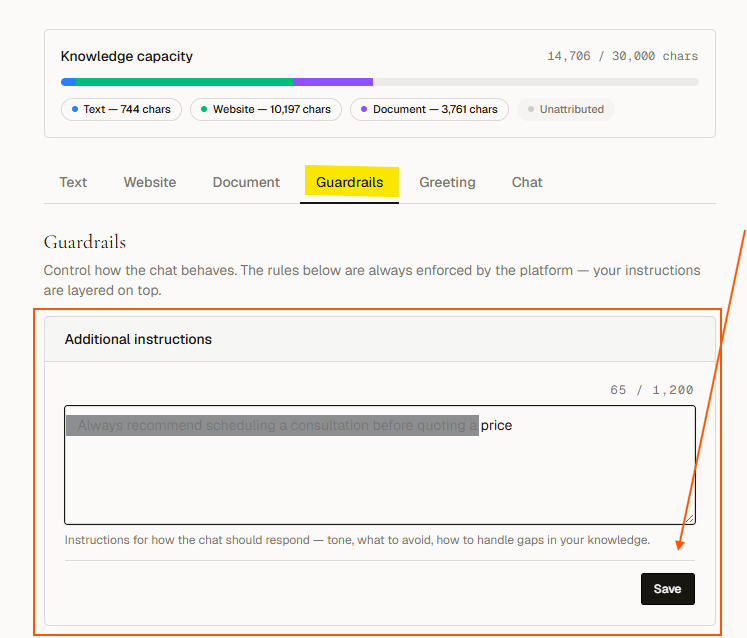 Click **Save behavior**. Changes take effect immediately for the next visitor chat session.
## Example guardrail
> Always recommend scheduling a consultation before quoting a price.
With this guardrail in place, if a visitor asks "How much does this cost?", the AI will explain that pricing depends on the specific project and suggest booking a consultation rather than giving a fixed number.
Guardrails work alongside the platform's core safety rules, not instead of them. You cannot remove built-in safety behaviors here.
The `[render]` and `[contact]` placeholders work inside chat messages you send to visitors (like a greeting or suggested question). Placing them in Guardrails instructions has no effect. They are stripped before the AI sees them.
## Next steps
* [Add knowledge sources](/chat/knowledge)
* [Configure the greeting message](/chat/greeting)
Click **Save behavior**. Changes take effect immediately for the next visitor chat session.
## Example guardrail
> Always recommend scheduling a consultation before quoting a price.
With this guardrail in place, if a visitor asks "How much does this cost?", the AI will explain that pricing depends on the specific project and suggest booking a consultation rather than giving a fixed number.
Guardrails work alongside the platform's core safety rules, not instead of them. You cannot remove built-in safety behaviors here.
The `[render]` and `[contact]` placeholders work inside chat messages you send to visitors (like a greeting or suggested question). Placing them in Guardrails instructions has no effect. They are stripped before the AI sees them.
## Next steps
* [Add knowledge sources](/chat/knowledge)
* [Configure the greeting message](/chat/greeting)