> ## Documentation Index
> Fetch the complete documentation index at: https://aibco.mintlify.site/llms.txt
> Use this file to discover all available pages before exploring further.
# Choose Your AI Visualization Model
> Pick an AI image model that controls render quality, speed, and credit cost. Each visualization produces 4 images per charge. Paid plans unlock all models.
AIBCO uses an AI image model to generate the visualizations visitors see on their property. Go to [Dashboard → Visualization model](https://aibco.ai/dashboard/render) to pick the model that matches your needs.
Your choice sets the credit cost for every render. Each model card shows two things: a speed/quality trade-off and a price written as **N credits / visualization**. Faster models use fewer credits; higher-quality models use more. All models draw from the same credit pool, so switching models never requires topping up a separate balance.
## How credits map to models
Current prices range from **6 to 16 credits per visualization**. One visualization produces **4 images** at different angles of the same product placement. The single charge covers all four.
## Pick a model
In your dashboard sidebar, click **Visualization model**.
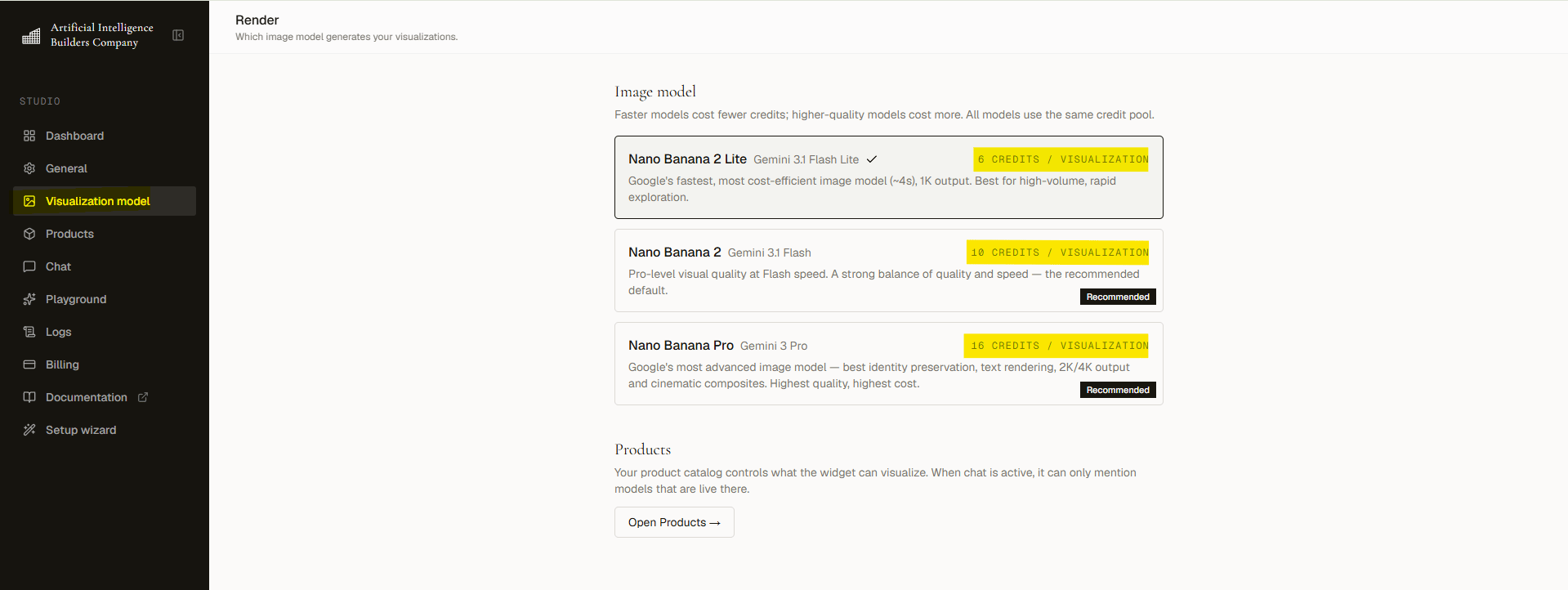 Each card lists its speed, quality level, and credit cost. Choose the trade-off that fits your brand and budget.
Click the card you want. The change applies to all new renders immediately.
## Free plan limits
Free plan accounts can only use the default model. Paid models show an **Upgrade to unlock** badge on their cards. Every paid plan unlocks all models.
## Related topics
* Understand your credit balance and how charges are applied on the [Credits](/logs/credits) page.
* Upgrade your plan from [Billing](/billing) to unlock all models.
Each card lists its speed, quality level, and credit cost. Choose the trade-off that fits your brand and budget.
Click the card you want. The change applies to all new renders immediately.
## Free plan limits
Free plan accounts can only use the default model. Paid models show an **Upgrade to unlock** badge on their cards. Every paid plan unlocks all models.
## Related topics
* Understand your credit balance and how charges are applied on the [Credits](/logs/credits) page.
* Upgrade your plan from [Billing](/billing) to unlock all models.